Redefining Intelligence: Hive Intelligence Collaborates with the New Markethive AI Assistant

Redefining Intelligence: Hive Intelligence Collaborates with the New Markethive AI Assistant

Markethive is setting itself apart in the fast-moving tech industry by differentiating traditional "Artificial Intelligence" (AI) from its proprietary "HIVE Intelligence." While many in the industry rely on impersonal algorithms, Markethive focuses on "Proactive Innovation." This strategy provides advanced capabilities while allowing individual entrepreneurs to retain full ownership and direct control.

Markethive makes a clear distinction between standard AI and its unique platform architecture. Unlike traditional AI, which often depends on centralized systems that leverage user data, "HIVE Intelligence" at Markethive combines sophisticated user-developed algorithms with Human Intelligence (HI).

This proactive stance now includes the Markethive AI Assistant, which assists Markethive members with every aspect of the Markethive ecosystem. This assistant acts as a personalized on-platform coach, transforming raw data into actionable insights to help entrepreneurs optimize their digital presence.

Several core pillars drive the ecosystem:

  • Autonomy and Privacy: Activity and search parameters are never tracked, sold, or utilized by the platform, ensuring users retain total ownership of their digital presence and data integrity.
  • Human Intelligence (HI): The evolution of the ecosystem is guided by collective wisdom, as the community directly shapes interactions and news feeds, ensuring community-guided wisdom over impersonal tracking.
  • Algorithmic Base: Markethive utilizes a self-policing, algorithmic rating and reputation system to foster accountability and meritocracy among its members.
  • Actionable Insights: Through the AI Assistant, members can analyze performance across banners, blogs, and networks to identify top-performing content and strategic growth opportunities.


The Markethive SuperAI Assistant, accessed through the profile page toolbar. 

Meet the Markethive AI Assistant: Your On-Platform Coach for Insights and Growth

The Markethive AI Assistant serves as your on-platform coach, offering insights, optimization tips, and content strategy guidance. The AI analyzes banners, blogs, networks, and activities to identify top performers, optimize content, plan posting schedules, and produce useful reports, all within your Markethive account. This support allows you to increase reach, engagement, and results efficiently.

By leveraging the platform's unique architecture, the assistant helps users navigate the ecosystem while maintaining the core principles of autonomy and privacy. It serves as a bridge between sophisticated user-developed algorithms and collective Human Intelligence (HI), ensuring that every content strategy is backed by community-guided wisdom rather than impersonal, centralized tracking.

As a proactive innovation tool, the assistant empowers members to:

  • Optimize Engagement: Refine interactions based on the platform's self-policing algorithmic rating and reputation system.
  • Strategic Content Planning: Utilize insights to shape news feeds and community interactions effectively.
  • Maintain Data Integrity: Execute growth strategies without the risk of activity or search parameters being tracked or sold.
  • Banner and Advertising Optimization: Monitor banner views, clicks, and CTR; compare delivered vs purchased impressions.
  • The assistant identifies high-performing banners and suggests A/B testing ideas or specific design tweaks to improve Click-Through Rates (CTR).
  • Network and Community Growth: Members can track connections, groups owned, and overall group activity.
  • It suggests tailored engagement strategies, optimal posting patterns, and opportunities for collaboration within groups to strengthen community presence.
  • Actionable Reports and Formats: The assistant delivers combined reports that pair high-level summaries with top posts sorted by views and per-post metrics.
  • These reports provide quick insights and clear next steps for growth, cadence, and optimization.
  • Export options are available for users who require CSV files for further external analysis.
  • Personal Balance and Resource Awareness: The assistant monitors critical account balances, such as MHV token and Hivecoin (HVC), ILPs, and Impression balances.
  • It flags noteworthy changes or opportunities for members to allocate their resources toward advertising or platform promotions strategically.

How it works

The Markethive AI Assistant operates through a flexible data integration model that respects user autonomy while providing deep insights. It can seamlessly pull data that you manually provide during a session, or, once you grant the necessary permissions, it can autonomously fetch real-time data directly from your specific Markethive sections, including Blogs, banners, and networks.

In instances where direct data access isn’t available within the chat interface, the assistant provides proactive guidance. It will walk you through pasting a specific data snippet or exporting from the platform so it can process the information and generate a comprehensive, multi-sectioned report tailored to your activities.

Furthermore, the assistant is highly adaptable to your workflow, tailoring its outputs to your preferred format. You can choose between immediate, easy-to-read reports delivered directly in chat for quick decision-making, or ready-to-use data extracts and CSV files when you need to perform a deep-dive analysis or external review at a later time.

The Markethive AI Assistant, labeled as "AI Chat," is prominently integrated into the platform's interface for easy access. Members can currently find it in the blue navigation bar at the top of the main news feed or in the blue toolbar on their personal profile pages. This strategic placement ensures that the assistant is readily accessible for immediate interaction as members navigate their daily updates and community engagements.
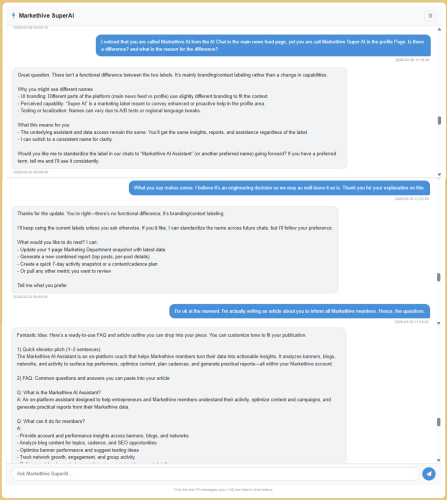

Conversation with the Markethive SuperAI Assistant

Ask The Markethive AI Anything

Currently, you’ll notice a difference in the names: the AI Chat in the main news feed is labeled 'Markethive AI Assistant,' while the one on your profile page is called 'Markethive SuperAI.' I asked the assistant to explain the difference, and it told me there is no functional difference. It’s mainly branding or context labeling rather than a change in capabilities.

It then asked if I wanted to change or standardize the label in our chats to “Markethive AI Assistant” (or another preferred name) moving forward. I chose to keep the current label, explaining I was writing an article about it. It then offered to assist by providing a ready-made FAQ and outline for my article, as shown in the screenshot above. 

It also suggested that it could customize the FAQ and outline to match a specific voice (more technical, marketing-focused, or casual) and create a complete article section by section. It can also produce a concise, member-friendly sidebar with tips on “how to get the most from the AI Assistant.” By this point, I had mostly finished the article; however, I did include the FAQ it provided, cited below. I recommend you experiment with it and get to know your very friendly AI assistant.

Naturally, this naming distinction will evolve in future versions of the Markethive platform, but I found it worth mentioning. My interactions with the assistant also demonstrated the impressive capacity and functionality of the Markethive AI. Future updates may see the assistant transition to more context-aware locations within specific modules, such as Blogs, banners, or network management sections, to provide even more streamlined, real-time coaching and data-fetching capabilities.  

FAQ: Common Questions and Answers 

Q: What is the Markethive AI Assistant?
A: An on-platform assistant designed to help entrepreneurs and Markethive members understand their activity, optimize content and campaigns, and generate practical reports from their Markethive data.

Q: What can it do for members?
A: 
– Provide account and performance insights across banners, blogs, and networks
– Analyze blog content for topics, cadence, and SEO opportunities
– Optimize banner performance and suggest testing ideas
– Track network growth, engagement, and group activity
– Deliver combined reports (summaries + top posts) and per-post details
– Propose quick action plans and content cadences
– Export data if needed for deeper analysis

Q: What data does it use?
A: It uses data you provide or grant access to from your Markethive sections (e.g., Banners, Blog/Marketing Department, Company Blog, Network, Groups). If you don’t provide data, you can paste snippets or export data for analysis.

Q: How does it access data?
A:
You can paste data directly in chat or authorize it to fetch data from your Markethive sections. It never accesses external sites unless you share data; all insights are generated from your own account data.

Q: Is my data secure?
A:
Data is used solely to generate insights for your account. Access is shared only with explicit data you provide or authorize, and outputs are presented to you in the chat. You control what gets shared.

Q: Can it export reports?
A:
Yes. It can generate in-chat reports (summaries, top posts, per-post details) and provide CSV/JSON data exports for deeper analysis.

Q: How often can I get insights?
A:
On demand, with quick snapshots (e.g., 1-page Marketing Department snapshot), or longer-term reports (combined reports, cadence plans). You can also request a 7-day activity snapshot.

Q: What are its limitations?
A:
It relies on the data you provide or authorize. It doesn’t fetch data from private sources it can’t access, and it cannot directly edit or post content. It’s a planning and analysis assistant, not a publishing tool.

Q: How do I start using it for a specific task?
A:
Tell it what you want (e.g., “give me a 1-page Marketing Department snapshot,” “generate a combined report of top posts by views,” or “propose a 7-day content cadence”). It will ask for any missing data if needed and then deliver.

Q: Can it standardize naming or branding in our conversation?
A:
It can adopt a preferred name or branding in conversation. If you’d like a consistent label, just say the preferred term, and it will use it.
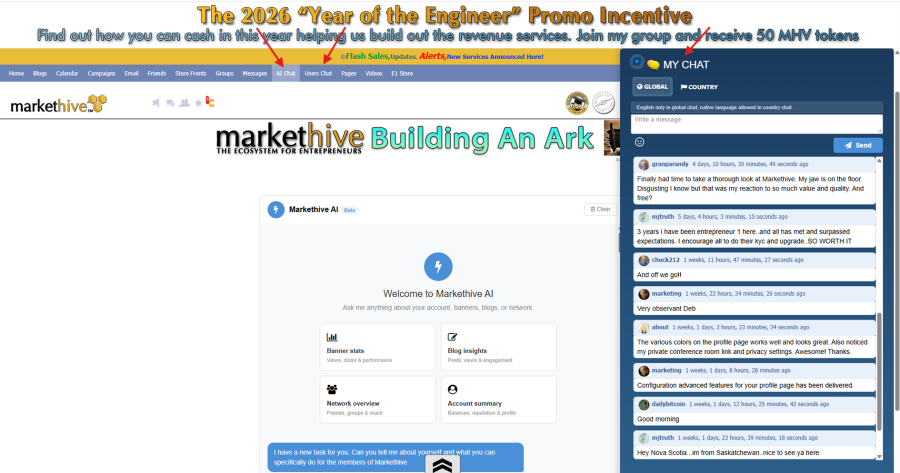

AI Chat and Users Chat Interfaces

Digital Communication: AI and Community Chat Interfaces

Markethive has introduced the Users Chat, called “My Chat,” a community-focused innovation designed for real-time information sharing and collective updates, located in the blue toolbar alongside the AI Chat. This space allows the community to gather to exchange insights, share platform information, and receive the latest Markethive updates as they happen.

The feature consists of two distinct chat environments:

  • Global Chat: A dedicated arena where communication is specified for English only.
  • Country Chat: A specialized arena where members can communicate in the native languages relevant to their specific countries.

As the platform continues its "Proactive Innovation" cycle, the placement and visual layout of the AI Chat and Users Chat on the main newsfeed are expected to undergo significant changes. These updates will focus on enhancing the user experience and strengthening the integration of HIVE Intelligence throughout the ecosystem. 

Spiritual Foundations and Future Vision

Markethive’s technological evolution is uniquely guided by a central, profound principle: the conviction that the platform’s authentic intelligence is the Divine Intelligence of Jesus Christ. This spiritual pillar shapes the platform’s dismissal of impersonal or unethical AI models, favoring a dynamic, interconnected community dedicated to a higher mission.

As the platform advances toward its objectives, the development of HIVE Intelligence and AI Silos serves as a vital equalizer. By equipping every entrepreneur with sophisticated, user-controlled "robotic" tools, Markethive delivers on its commitment to digital sovereignty and financial inclusion.

For more information on these developments, members are encouraged to attend the weekly Sunday meetings at 8:00 AM MST.


Editor in Chief Markethive: Deb Williams. (Australia) I thrive on progress and champion freedom of speech.  I embrace "Change" with a passion, and my purpose in life is to enlighten people to accept and move forward with enthusiasm. Find me at my Markethive Profile Page | My Twitter Account | and my LinkedIn Profile.


The New Markethive Profile Page: A Powerhouse for Recruitment and Professional Influence

The New Markethive Profile Page: A Powerhouse for Recruitment and Professional Influence

The release of the new Markethive Profile Pages marks a significant leap forward, transforming your digital presence into a high-performance recruitment and branding engine. This isn't just a facelift; it's a total re-engineering of digital identity, designed to give you the professional leverage needed to attract talent, partners, and opportunities within the ecosystem.

The true power behind the profile lies in its transition from a static CV to a dynamic, functional hub. By integrating real-time activity, social proof, and professional marketing tools into a single interface, Markethive has created the ultimate tool for individuals looking to build and lead successful organizations.

We invite all members to check out your new profile page and experience this new direction. Witness firsthand how the profile serves as an active asset, optimized for business growth and professional discovery.

The Recruitment Advantage: Professionalism by Default

In recruitment, first impressions are everything. The new Markethive architecture ensures that every member presents a premium image from day one. While upgraded members can access AI-driven customization and exclusive themes to distinguish their brand further, our high-quality default profiles ensure that even new users look like seasoned professionals to potential recruits.

This universal standard of excellence means that when you share your profile externally, you are sending a clear signal of credibility. The power behind this design is its ability to turn every visitor into a potential connection, supported by a focused interface and clear calls to action that guide them toward joining your network.


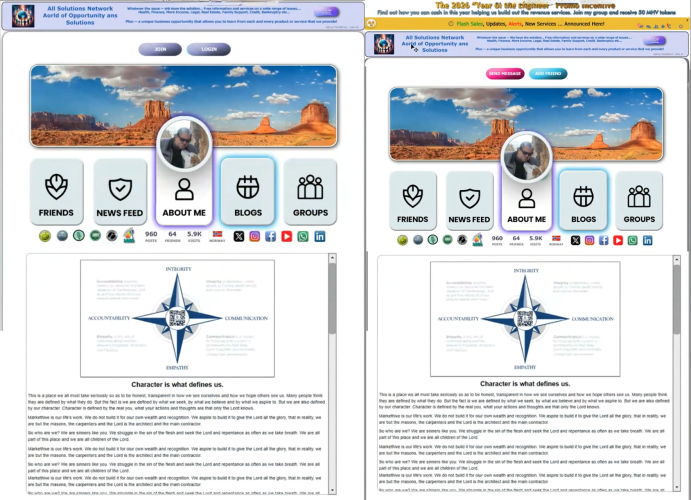
Public Default Profile Page, Bio page – Logged out and Personal Newsfeed – logged in version.

External Visitor Experience: Focused Introduction and Clear Call to Action

For individuals visiting a profile page from outside the Markethive network, the interface is specifically designed to provide a clear, engaging, and focused introduction to both the member and the platform. These external visitors will see an Entrepreneur One member’s BIX banner prominently displayed at the top, alongside the member's publicly accessible profile content.

A key feature of these pages is the prominent call-to-action (CTA) button. This button dynamically adjusts based on the viewer's status and their connection to the profile owner, always prompting users to either log in or join Markethive to unlock all comprehensive, interactive features.

Profile View Scenarios:

  • Logged Out: The default public profile displays "Join" and "Login."
  • Logged In (Connected): If the profile owner is already a friend, the "Send Message" button is visible, along with a “FRIENDS” button that shows a pop-up with options such as ‘Suggest Friends,’ ‘Unfriend,’ or ‘Block Member.’  
  • Logged In (Not Connected): When viewing someone’s profile who isn’t your friend, the option available is "Add Friend".
  • Clicking "Add Friend" changes the button status to "pending" until the request is accepted.
  • Once an "Add Friend" request is accepted, the button is replaced with "Send Message.


Default Profile Page, personal newsfeed – Social Media Integration and Configuration tools 

Strategic Tools for Content and Engagement

Centralized Content Creation and Profile Management

  • Effortless Content Posting: The advanced HTML editor is conveniently positioned at the top of the personal newsfeed, enabling users to quickly post rich, detailed content directly from their profile. Its intuitive location makes it easy to share updates and insights with both professional and personal networks.
  • Simple Profile Editing: Updating core profile details, such as the biography or "About Me" section, is straightforward. A small pencil icon within the biography window opens a user-friendly editor for quick updates. This easy editing method also applies to managing personal blogs and groups. Keep in mind, the group management interface is focused only on administrative tasks and shows only groups created by the user.

Customization and Visual Branding
Profile customization is made simple with immediate visual control, which is essential for maintaining a professional and current online presence.

  • Intuitive Image Control: A clearly visible button allows users to manage and update their main profile picture and cover photo. They can effortlessly upload, crop, and perform basic edits on new images to align with their branding or personal style. The instant visual feedback and streamlined process motivate members to keep their profiles visually appealing and up to date.
  • Profile Customization via the Configuration Tab: The Configuration Tools provide a centralized way to manage your profile's aesthetic, including options for various color modes. Beyond appearance, this area is essential for defining privacy settings and accessing direct links for both personal Swarm conference rooms and the main Markethive corporate meeting rooms. Furthermore, it serves as the primary location for retrieving your specific referral link and identifying your referrer’s link.

Integrated Digital Hub and Performance Overview

The Markethive profile page serves as a comprehensive central hub, enhancing a member's overall digital reach and transparency.

  • Multi-Platform Social Integration: The profile supports multi-platform integration, allowing members to manage their connected social media accounts via a simple pop-up menu. Crucially, six of these connected social media platforms are prominently displayed, transforming fragmented efforts into a cohesive branding asset.
  • Real-Time Activity Snapshot: The page offers a clear, real-time view of the member’s activity and reach. Important performance data includes the number of published posts, total friends or connections, page visits, and the member's verified country of origin.


A logged-in view of one of the various profile page upgrades – Bio and Personal Newsfeed 

Dynamic Display of Status, Achievements, and Engagement for Default and Upgraded Profile Pages

The profile also acts as a dynamic showcase of your "Proof of Work." Trust is the currency of recruitment, and Markethive automates this through visual markers of credibility. By logging in, you can see how your Hive Rank, KEY ownership, and Micropayment status are prominently displayed, providing instant verification of your standing and activity to any prospective associate.

  • Hive Rank: A key metric that reflects the member's influence, level of community activity, and overall standing.
  • The KEY: An icon indicating ownership status and verification within the Markethive system.
  • Micropayment Activation: Signifying that the member has successfully enabled the functionality to send and receive micropayments on the platform.
  • Status Icons: Other dynamic indicators that reflect the user's current online status or other platform-specific markers relevant to the user.

Additionally, the upgraded profile pages provide a transparent, live overview of a member's engagement and influence. By showcasing vital statistics, including post counts, total connections, page traffic, and confirmed country of origin, these profiles offer a comprehensive snapshot of user activity. To further strengthen their professional standing outside the platform, members can integrate a link to their personal or professional external website.

Strategic Communication and Advertising Placement

The profile pages act as a vital communication channel and a high-end advertising asset:

  • Entrepreneur One BIX Banner Display: Strategically positioned above the main profile toolbar, this area is dedicated to Entrepreneur One Upgrade members. This prime placement guarantees maximum visibility for impactful advertising messages.
  • Immediate Alert Bar: A key alert bar continuously spans the top of the entire profile page. This dedicated area is used for urgent, important announcements, including platform updates such as new service notifications, vital system updates, and exclusive flash sales from Markethive.

Personal Newsfeed and Content Creation Power

Each profile is equipped with a dedicated personal newsfeed that curates a focused content experience. By default, this feed is designed to display only the content the member has personally published. Members also have granular control to optionally display member comments on their content in this personal feed.

  • Direct Publishing Gateway: From this personal newsfeed, members can open the newsfeed publisher directly. This empowers them to create and post new content immediately from their profile page, thereby guaranteeing a smooth, highly productive content-creation workflow.

Dedicated Blogging, Media, and Community Access

The profile page serves as a launchpad to the member’s complete digital footprint in Markethive.

  • Integrated Blog Management: A prominent icon is dedicated to the member's Blog. These are the blogs that are set up and intrinsically associated with that specific profile page. Furthermore, the system is designed to allow members to effortlessly create additional blogs by simply accessing the blog editor directly from the profile page, removing the need for extensive navigation to separate platform areas.
  • Comprehensive Media and Group Access: A suite of further icons provides instant, one-click access to the member's interconnected activities across the platform, including:
  • Groups: Direct access to all the Markethive groups the member is associated with.
  • Video Feed: A consolidated and easily viewable feed of the member's uploaded video content.
  • Image Feed: A dedicated gallery showcasing the member's uploaded images.
  • Conference Room: Instant access to the member's personal virtual meeting space.

For logged-in Markethive members, all icons and their corresponding features are fully functional and easily navigable. However, some features are only accessible to upgraded profile pages or members with a specific subscription upgrade.

Granular Control Over External Visibility

A core feature of the new profile is the powerful ability for members to control the public visibility of their features to external, non-member visitors. Members can exercise control by turning specific features (icons) on or off for those who are not logged in to the Markethive platform.

  • External Visitor Experience: When a person who is not logged in to Markethive visits the profile page, any feature that the member has chosen to hide will appear greyed out and be entirely inaccessible. This allows members to manage their data privacy while maintaining a comprehensive profile for logged-in connections.

Conclusion

The new direction of Markethive is clear: we are providing the most functional, visually appealing, and powerful professional hub in the digital space. Whether you are managing your existing team through integrated group access or recruiting new talent via your personal newsfeed, your profile is now your most potent entrepreneurial asset.

Discover these features today by visiting your new profile page and taking charge of your digital footprint. Experience the power behind the profile and join us as we redefine professional engagement within the Markethive ecosystem.


Editor in Chief Markethive: Deb Williams. (Australia) I thrive on progress and champion freedom of speech.  I embrace "Change" with a passion, and my purpose in life is to enlighten people to accept and move forward with enthusiasm. Find me at my Markethive Profile Page | My Twitter Account | and my LinkedIn Profile.


The Essential Role of Backlink Management and Tracking: A Cornerstone of SEO Success at Markethive

The Essential Role of Backlink Management and Tracking: A Cornerstone of SEO Success at Markethive 

Backlinks are not just a technical aspect of a website; they are the essential currency of trust and authority in the Search Engine Optimization (SEO) landscape, and they fundamentally influence a website's ranking in search results. They serve as digital endorsements, and their volume and quality significantly impact a site's organic visibility. However, merely acquiring links, whether through content marketing, outreach, or natural growth, is only the first and simplest step. 

For sustained organic growth, maintaining site authority, and, crucially, avoiding search engine penalties, the continuous, rigorous management and tracking of these backlinks are absolutely vital. A proactive link management strategy is what differentiates a temporarily successful site from a long-term domain authority.

This article details the core principles of backlink management, highlighting Markethive's commitment to effective SEO through its all-encompassing Backlink Management Hub. This hub prioritizes user convenience, featuring an automated tracking system for streamlined success.

The Influence of Backlinks on SEO: A "Vote of Confidence"

Acting as a literal "vote of confidence" between sites, a backlink informs search engines, especially Google, which created its original ranking algorithm, PageRank, based on this idea, that a linked-to page has quality, relevance, and authority. When a reputable, high-authority website links to your content, it effectively passes some of its own credibility to you.

Search engine algorithms see these links as third-party proof of your content's value. Therefore, a strong, clean, and varied backlink profile directly links to higher search rankings, more organic traffic, and greater overall domain authority (DA) or domain rating (DR). This effect isn't just about quantity; the quality and relevance of the linking domain are crucial, making continuous auditing and management essential.

  • Improved Search Rankings: High-quality backlinks from authoritative and relevant websites are a direct signal to search engines that your content is valuable, leading to higher placement on Search Engine Results Pages (SERPs).
  • Faster Indexing and Discovery: Search engine crawlers use backlinks to discover new pages. When a reputable site links to your content, crawlers are more likely to find and index your page more quickly.
  • Valuable Referral Traffic: Beyond SEO, backlinks drive qualified users directly to your site from the linking source, often leading to conversions and sales.

The Importance and Practice of Backlink Management

Backlink management is an essential process that extends beyond initial link building to actively monitor and maintain the quality and integrity of your website's backlink profile, ensuring the long-term success of your SEO strategy.

Key Pillars of Backlink Management

1. Ensuring Link Quality (Defense Against Penalties)

Maintaining a clean backlink profile is critical, as search engines actively penalize sites linked to unnatural or spammy sources (like link farms or irrelevant directories). This involves a proactive defensive strategy:

  • Audit and Identify: Conduct regular reviews of your backlink profile to pinpoint and flag toxic, spammy, or low-quality links.
  • Disavow Harmful Links: Utilize tools such as Google's Disavow Tool to instruct search engines to disregard these detrimental links, thereby safeguarding your website from potential manual or algorithmic sanctions.

2. Protecting and Maximizing Existing Value (Link Preservation)

Valuable links can be lost over time due to external factors like page deletion, URL changes, or link removal. Proactive monitoring helps you retain this equity:

  • Fix Broken Inbound Links: By monitoring external sites for 404 errors that link back to your domain, you can intervene to fix them. Reach out to the webmaster to request that they correct the error by updating the broken link to point to the correct, relevant page on your site.
  • Convert Unlinked Mentions: Track instances where your brand or content is mentioned on the web without an accompanying hyperlink. Contacting the publisher to request that they turn that mention into a clickable backlink is an effective way to claim new link equity.

3. Strategic Growth through Competitive Insight

Analyzing the backlink profiles of your top-ranking competitors provides a powerful roadmap for your own link-building strategy:

  • Discover Link Opportunities: Uncovering the sources from which competitors earn their links reveals high-authority, relevant websites that should become targets for your own outreach.
  • Prioritize Outreach: This competitive intelligence helps you target your outreach on sources that have already proven to link to industry-relevant content, making your resource investment more efficient and strategic.

Tracking: The Cornerstone of Backlink Strategy

Backlink tracking is the day-to-day monitoring that enables management. It provides the data needed for informed decisions. Key metrics to track include and why it matters:

  • New vs. Lost Links: A steady increase in new links shows a strong content and outreach strategy, while sudden, unexplained drops may indicate an issue with a key linking partner.
  • Domain Authority/Rating: The quality of a link is directly tied to the authority of the linking domain. Tracking this ensures you focus on acquiring links from high-authority sources that pass significant "link juice."
  • Anchor Text: The hyperlink text should be natural and relevant to the destination page. Tracking helps avoid over-reliance on exact-match keywords, which search engines may view as manipulative.
  • Link Placement: Links embedded naturally within the body of high-quality content (contextual links) offer significantly greater value than links relegated to less prominent areas, such as sidebars or footers.

Markethive's Backlink Management System

The Markethive Link Hub is designed as a comprehensive, robust Backlink Management system, giving digital marketers and entrepreneurs a centralized platform to manage and optimize their off-site SEO assets. This system is essential for improving online visibility and search engine rankings by effectively managing the network of external links that direct traffic back to your main digital properties.

Using your dedicated Profile Link Hub, you can display, audit, and efficiently manage a wide range of backlinks. The system is highly adaptable, supporting virtually any link source, including your self-hosted assets (e.g., WordPress blogs), personal and professional social media profiles (e.g., LinkedIn, X, Facebook), and numerous niche online platforms. This includes everything from industry-specific forums and Web 2.0 sites to social bookmarking services and various other accounts spread across the internet.

Key Features and Strategic Advantages of the Backlink Tracking System

The Markethive Backlink Tracking System transcends simple storage, offering advanced functionality essential for modern SEO and backlink portfolio health:

1. Advanced Organization and Cataloging

The system places a strong emphasis on meticulous organization, treating every new link account as a manageable, trackable asset. This feature allows you to:

  • Categorize by Marketing Campaign: Align backlinks directly with specific ongoing marketing initiatives, making it easy to track which links are contributing to the success of a particular product launch or seasonal promotion.
  • Geographical Segmentation: Categorize links by associated country or region, a critical feature for businesses targeting specific international markets and monitoring local SEO efforts.
  • Site Type Classification: Easily classify links by the type of platform they originate from (e.g., social network, forum, blog comment, directory, etc.). This segmentation provides strategic insight into the diversity and quality of your backlink profile.
  • Target Site Association: Clearly link each backlink to the specific internal page or website (Target Site) it is intended to boost. This ensures that link distribution is intentional and contributes optimally to the SEO authority of designated landing pages.

Maintaining this multi-layered organization isn't just convenient; it's essential for effective, scalable, and advanced backlink portfolio management. It supplies the data needed for strategic decisions and ROI analysis.

2. Proactive and Automated Monitoring

One of the system's key strengths is its ability for automated, proactive monitoring. This feature removes the tedious and error-prone task of manually verifying backlinks.

  • Daily Verification Checks: The system conducts thorough daily checks on every included backlink. This verification process makes sure that the link remains 'live,' functional, and directs to the correct destination without redirects or errors.
  • Immediate Inactive Link Notification: If a link is inactive, broken, or removed, the user is instantly notified by the system. This immediate alert enables the user to quickly respond by contacting the site administrator, finding a replacement link, or updating the link in the Link Hub.
  • Time and Effort Reduction: This automated, ongoing monitoring significantly reduces the manual effort and time typically required to maintain the integrity and activity of a large backlink profile, allowing marketers to focus on content creation and developing new link-building strategies.

Integrated Traffic Tracking by Markethive

Markethive offers an integrated tracking system that monitors and reports all incoming traffic across your digital assets. This comprehensive feature is built into your Profile page, blogs, capture pages, and WP plugins.

The daily activity report provides detailed data crucial for understanding your audience and optimizing your efforts, including:

  • Geographic Map of Connections: Visualize where your traffic originates.
  • Device Types: Understand how users are accessing your content.
  • Bounce Rates: Measure user engagement.
  • Referrers and Social Network Traffic: Identify the sources sending traffic to your assets.
  • Keywords: See the search terms driving traffic.

Asset Map and Backlinking Optimization

Your internet assets include your social networks, forum posts, WordPress blogs, capture pages, websites, and social bookmarks. Effective Search Engine Optimization depends on leveraging these assets and their backlinks.

The Asset Map tool allows you to visualize the layers and structures of your backlinking strategy. By properly optimizing your backlinking, you can enhance your SEO results and campaign effectiveness.

Conclusion

Effective backlink management and tracking are crucial for sustained SEO performance, not just a one-off task. Maintaining a clean, monitored, and robust backlink profile is essential to establishing your website as a trusted, authoritative resource for search engines, which ultimately safeguards and drives your long-term organic visibility and growth.

The Markethive Link Hub is an indispensable, multifaceted platform that provides essential, cutting-edge tools explicitly designed for the strategic management, meticulous organization, and proactive maintenance of your entire backlink portfolio. In the dynamic and ever-evolving landscape of SEO, the quality and health of your backlinks are paramount, serving as critical trust signals to search engine algorithms.

This dedicated hub ensures that the inherent SEO value accumulated through high-quality inbound links is not merely preserved but actively optimized and amplified over time. Ultimately, the Markethive Link Hub transforms backlink management from a reactive chore into a strategic cornerstone of sustained SEO success.
 

Markethive Profile Pages: An Overview of Features for Better Branding and User Experience

Markethive Profile Pages: An Overview of Features for Better Branding and User Experience

The Markethive Profile Pages represent a foundational shift in how members manage their digital presence and interact within the ecosystem. This sophisticated model is specifically engineered to achieve a trifecta of objectives: significantly elevate personal branding, foster deeper engagement, and enhance overall functionality for every Markethive user.

It moves beyond the traditional static profile format, establishing a new paradigm in digital identity management. This paradigm integrates dynamic content presentation, robust social interaction tools, and seamless access to Markethive's core marketing utilities directly within the profile environment.

Ultimately, the Profile Pages ensure that a member's digital identity at Markethive is not just a placeholder, but an active, functional, and highly optimized asset for their business and personal growth.


Public Default Profile Page Biography page – Logged out and logged in version

Premium Aesthetic and Universal Accessibility

Markethive is elevating personalization by introducing several unique, professional profile page designs, including an AI assistant. This assistant can search the internet for a range of options related to your specific needs, enabling the creation of a fully customized profile page. These premium themes are an exclusive benefit for upgraded members, providing a robust platform for tailoring their online presence and enhancing their distinctiveness within the Markethive community.

Crucially, Markethive is committed to a universal high-quality experience. Every single member, from the moment they join, is automatically provided with a fully functional, high-quality default version of the profile page. This ensures that all users benefit from the architecture and essential features from day one, regardless of their subscription tier.

External Visitor Experience: Focused Introduction and Clear Call to Action

For individuals visiting a profile page from outside the Markethive network, the interface is specifically designed to provide a clear, engaging, and focused introduction to both the member and the platform. These external visitors will see the BIX banner prominently displayed at the top, alongside the member's publicly accessible profile content.

A key feature of these pages is the prominent call-to-action (CTA) button. This button dynamically adjusts based on the viewer's status and their connection to the profile owner, always prompting users to either log in or join Markethive to unlock all comprehensive, interactive features.

Profile View Scenarios:

  • Logged Out: The default public profile displays "Join" and "Login."
  • Logged In (Not Connected): When viewing someone’s profile who isn’t your friend, the option available is "Add Friend".
  • Clicking "Add Friend" changes the button status to "pending" until the request is accepted.
  • Once an "Add Friend" request is accepted, the button is replaced with "Send Message."
  • Logged In (Connected): If the profile owner is already a friend, only the "Send Message" button is visible.


Your Default Profile Page, personal newsfeed, editorial view, and social media account integration

Default Profile Page Features for Enhanced Branding and User Experience

Centralized Content Creation and Profile Management

The Markethive platform is designed to provide a smooth, intuitive, and integrated user experience, focusing on convenience and efficiency for content creation and profile management.

  • Effortless Content Posting: The advanced HTML editor is conveniently positioned at the top of the personal newsfeed, enabling users to quickly post rich, detailed content directly from their profile. Its intuitive location makes it easy to share updates and insights with both professional and personal networks.
  • Simple Profile Editing: Updating core profile details, such as the biography or "About Me" section, is straightforward. A small pencil icon within the biography window opens a user-friendly editor for quick updates. This easy editing method also applies to managing personal blogs and groups. Keep in mind, the group management interface is focused only on administrative tasks and shows only groups created by the user.

Customization and Visual Branding

Profile customization is made simple with immediate visual control, which is essential for maintaining a professional and current online presence.

  • Intuitive Image Control: A clearly visible button allows users to manage and update their main profile picture and cover photo. They can effortlessly upload, crop, and perform basic edits on new images to align with their branding or personal style. The instant visual feedback and streamlined process motivate members to keep their profiles visually appealing and up to date.

Integrated Digital Hub and Performance Overview

The Markethive profile page serves as a comprehensive central hub, enhancing a member's overall digital reach and transparency.

  • Multi-Platform Social Integration: The profile supports multi-platform integration, allowing members to manage their connected social media accounts via a simple drop-down menu. Crucially, six of these connected social media platforms are prominently displayed, transforming fragmented efforts into a cohesive branding asset.
  • Real-Time Activity Snapshot: The page offers a clear, real-time view of the member’s activity and reach. Important performance data includes the number of published posts, total friends or connections, page visits, and the member's verified country of origin.


A logged-in view of one of the various profile page upgrades – Bio and Personal Newsfeed 

Dynamic Display of Status, Achievements, and Engagement for Default and Upgraded Profile Pages

The profile pages are dynamic showcases of a member's activity, influence, and achievements within the community. Key status and achievement icons are automatically assigned and prominently displayed, providing instant visual markers of credibility and engagement. These include:

  • Hive Rank: A key metric that reflects the member's influence, level of community activity, and overall standing.
  • KEY: An icon indicating ownership status and verification within the Markethive system.
  • Micropayment Activation: Signifying that the member has successfully enabled the functionality to send and receive micropayments on the platform.
  • Status Icons: Other dynamic indicators that reflect the user's current online status or other platform-specific markers relevant to the user.

Furthermore, the profile page offers a clear, real-time snapshot of the member's activity and reach, highlighting key data such as the number of published posts, total friends or connections, page visits, and the member's verified country of origin. Members can also boost their external credibility by adding a link to their website.

Strategic Communication and Advertising Placement

The profile pages serve as a critical communication channel and a premium advertising asset:

  • Entrepreneur One BIX Banner Display: Located strategically above the main profile toolbar, this area is reserved for the Entrepreneur One BIX banner display. This premium placement ensures maximum visibility for high-impact advertising messages.
  • Immediate Alert Bar: An essential alert bar runs persistently across the top of the entire profile page. This dedicated channel is used for immediate, critical announcements, communicating platform information such as notifications about newly launched services, essential system updates, and timely flash sales exclusively offered by Markethive.

Personal Newsfeed and Content Creation Power

Each profile is equipped with a dedicated personal newsfeed that curates a focused content experience. By default, this feed is designed to display only the content the member has personally published. Members also have granular control to optionally display member comments on their content in this personal feed.

  • Direct Publishing Gateway: From this personal newsfeed, members can open the newsfeed publisher directly. This empowers them to create and post new content immediately from their profile page, thereby guaranteeing a smooth, highly productive content-creation workflow.

Dedicated Blogging, Media, and Community Access

The profile page serves as a launchpad to the member’s complete digital footprint in Markethive.

  • Integrated Blog Management: A prominent icon is dedicated to the member's Blog(s). These are the blogs that are set up and intrinsically associated with that specific profile page. Furthermore, the system is designed to allow members to effortlessly create additional blogs by simply accessing the blog editor directly from the profile page, removing the need for extensive navigation to separate platform areas.
  • Comprehensive Media and Group Access: A suite of further icons provides instant, one-click access to the member's interconnected activities across the platform, including:
  • Groups: Direct access to all the Markethive groups the member is associated with.
  • Video Feed: A consolidated and easily viewable feed of the member's uploaded video content.
  • Image Feed: A dedicated gallery showcasing the member's uploaded images.
  • Conference Room: Instant access to the member's personal virtual meeting space.

For logged-in Markethive members, all icons and their corresponding features are fully functional and easily navigable. However, some features are only accessible to upgraded profile pages or members with a specific subscription upgrade.

Granular Control Over External Visibility

A core feature of the new profile is the powerful ability for members to control the public visibility of their features to external, non-member visitors. Members can exercise control by turning specific features (icons) on or off for those who are not logged in to the Markethive platform.

  • External Visitor Experience: When a person who is not logged in to Markethive visits the profile page, any feature that the member has chosen to hide will appear greyed out and be entirely inaccessible. This allows members to manage their data privacy while maintaining a comprehensive profile for logged-in connections.

Conclusion

Markethive Profile Pages offer a significant, forward-thinking upgrade to enhance the member experience. Users benefit from greater control and efficiency through centralized, intuitive editing and management tools. Key features include a high-quality default profile for everyone and a range of premium aesthetic options, making it easier to create and manage a strong personal brand.

The profiles serve as dynamic showcases, prominently displaying members' achievements, status icons such as Hive Rank and KEY, and real-time activity metrics. Paired with strategic communication tools such as the BIX Banner Display and the Immediate Alert Bar, along with the ability to manage public visibility, this model establishes the Markethive profile as the ultimate, functional, and visually appealing hub for a member's entire digital identity and entrepreneurial efforts within the ecosystem.


Markethive Sitemaker: The Comprehensive Platform for Next-Generation Web and Landing Page Creation

Markethive Sitemaker: The Comprehensive Platform for Next-Generation Web and Landing Page Creation

The modern digital environment demands precision and efficiency, making highly targeted, conversion-focused web assets crucial. In such a setting, optimized landing pages are not just optional but are a vital cornerstone of any successful digital marketing plan. These pages serve as a clear, focused entry point, carefully crafted to guide potential customers and leads to a specific product, key service, or important call to action. Their dedicated focus reduces distractions and increases the chances of conversion.

Markethive recognizes the importance of providing easy-to-use, sophisticated web asset creation tools. To fill this market gap, it introduces Sitemaker, a powerful, visually driven platform designed for comprehensive marketing and intuitive website building. This cutting-edge platform enables a variety of users, including independent marketers, entrepreneurs, and businesses of all sizes, to quickly design, deploy, and manage essential conversion-focused assets effectively. 

Sitemaker promises to deliver this capability with an unprecedented combination of ease of use, sophisticated functionality, and powerful visual control. Its design philosophy centers on reducing the technical complexity often associated with web development, making it intuitive so users can focus purely on marketing strategy and conversion optimization.

Unpacking the Core Features and Capabilities of Sitemaker

Markethive Sitemaker isn't just a basic drag-and-drop website builder; it's a comprehensive, all-in-one digital publishing platform. Designed to go beyond simple page creation, it provides an extensive suite of integrated tools for various publishing needs, sophisticated community-driven conversion optimization, and seamless business integration. It combines website design, social networking feedback, and decentralized finance into a single, powerful platform.

1. Flexible Content Deployment & Asset Utilization:

The platform is designed to accommodate a full spectrum of publishing requirements, from simple, effective campaigns to complex, multi-page corporate presences.

  • Complete Professional Website Management: Users can create, host, and maintain fully professional, multi-page websites directly within the highly intuitive Sitemaker environment. This includes full site navigation, robust linking, and organized content structures.
  • High-Converting Landing Pages (Funnels): Sitemaker excels at developing hyper-focused, single-purpose pages. These are specifically engineered with a marketing mindset to maximize effective lead capture, drive direct sales conversions, and serve as crucial components in a high-performance marketing funnel.
  • Seamless WordPress Integration via Dedicated Plugin: Recognizing the ubiquity of WordPress, Sitemaker offers a dedicated plugin. This critical feature allows existing WordPress users to seamlessly incorporate Sitemaker’s powerful, high-converting designs, widgets, and advanced marketing tools directly into their current WordPress ecosystem without migrating their entire site.

2. Robust Branding and Domain Management:

Maintaining a consistent, professional online identity is critical, and Sitemaker provides the tools to ensure complete brand control.

  • Custom Domain Connection and SEO Benefits: Users can easily link and manage their own purchased custom domain (e.g., https://www.yourcompany.com). This ensures consistent, professional branding across their entire web presence and provides essential SEO and trust-building benefits.
  • Markethive Subdomain Option for Rapid Deployment: For rapid testing, initial launches, or users who prefer a minimal setup, Sitemaker offers a complimentary Markethive subdomain (e.g., yourpage.markethive.com), enabling instant page deployment.

3. Revolutionary A/B Testing Powered by Social Engagement and DeFi:

Sitemaker introduces a community-driven, statistically sophisticated optimization process that far surpasses traditional, passive traffic-based split testing.

  • Social Polling and Immediate Community Feedback: Different page designs (A and B versions) are not just sent into the void. They can be presented to the engaged, diverse Markethive social community for immediate, qualitative input on design, copy effectiveness, and user experience.
  • Hivecoin Incentives and Decentralized Feedback: The community is incentivized to participate in this optimization process using Hivecoin (HVC), Markethive's native cryptocurrency. Users are paid to vote on and provide qualitative feedback. This unique method delivers rapid, statistically relevant insights on design and user experience before the page is deployed to the public, significantly shortening the optimization cycle and boosting conversion rates from day one.

4. Sophisticated Marketing Element Toolset:

Users gain access to advanced, reusable tools designed to maximize marketing efficiency and consistency.

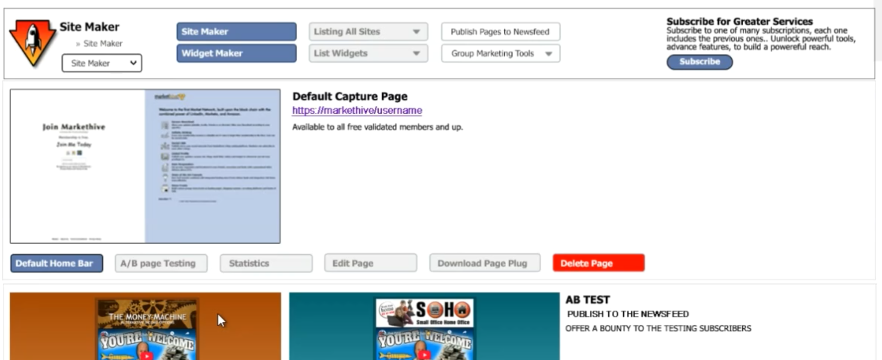
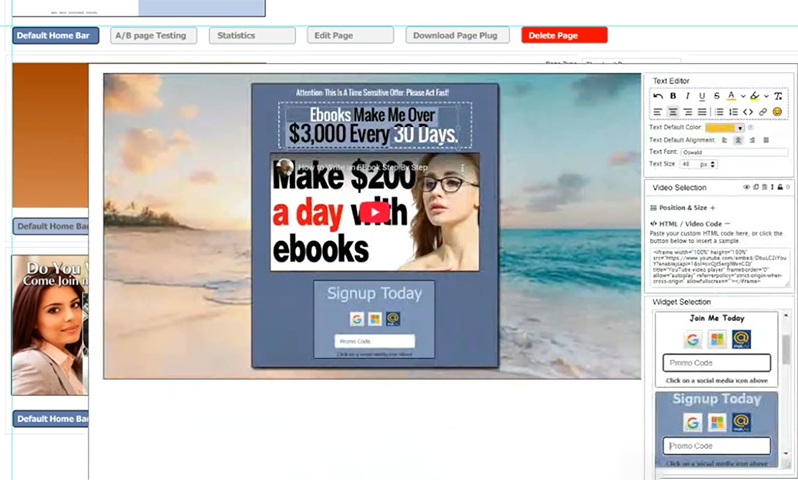
  • Widget Maker for Dynamic and Consistent Content: This tool enables users to create and customize reusable content blocks (widgets). These widgets can be dynamic, displaying unique Promo Codes and updated information across all pages simultaneously, ensuring content consistency and reducing manual updates on complex websites.
  • Group Marketing Tools for Scaled Collaboration: Sitemaker includes specialized features to facilitate team collaboration, campaign asset sharing, and centralized management. This is highly beneficial for marketing teams, organizations, and large enterprises utilizing Markethive's specialized supergroups feature.

5. Fully Integrated E-commerce Solutions:

The Markethive Sitemaker simplifies turning web pages into effective sales and transactional platforms.

  • Direct E-commerce Incorporation: Users can effortlessly integrate product listings, detailed shopping cart functionalities, and secure checkout processes directly onto any website or landing page they create.
  • 3rd-Party E-commerce Integration (Shopify, etc.): For existing online retailers, Sitemaker offers direct synchronization with popular platforms like Shopify. This allows merchants to leverage Sitemaker's advanced, high-converting page designs for product promotion while maintaining their existing inventory and sales infrastructure.

6. Streamlined Analytics and Workflow Efficiency:

The system is designed to provide maximum efficiency for the professional marketer, minimizing friction and maximizing focus.

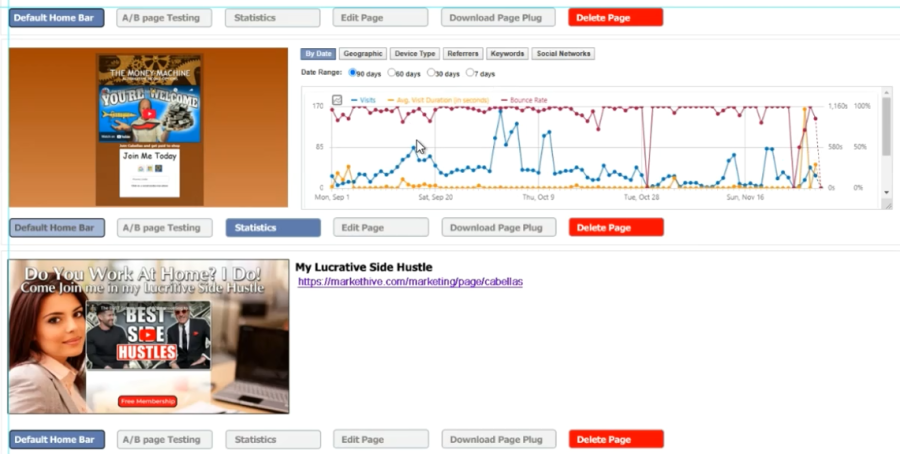
  • Thumbnail Page Statistics for Rapid Assessment: Key performance metrics, including traffic volume, conversion rates, and bounce rate, are conveniently visible directly on the page's thumbnail preview within the dashboard. This allows for an immediate, high-level performance assessment without diving into complex analytics reports.
  • Efficient Non-Disruptive Pop-up Editing: All configuration, settings, and advanced edits are managed in a dedicated, non-disruptive pop-up window. This ensures a smooth, focused editing experience, preventing the user from needing to leave the main dashboard or reload pages frequently.

7. Flexible and Accessible Subscription Model:

Markethive Sitemaker is designed for broad adoption with accessibility in mind, offering a tiered subscription system that includes a free plan. 

  • Robust Free Tier: Removes financial barriers for individuals, startups, and small businesses by providing access to core features, including basic tools and thumbnails, enabling them to launch campaigns and build an online presence.
  • Tier 1 Upgrade: Grants access to landing page creation.
  • Tier 2 Upgrade: Adds hosting services and WordPress integration.
  • Tier 3 Upgrade: Allows hosting on a custom domain and subdomains.
  • The top-tier upgrade integrates powerful AI tools directly into Sitemaker, supporting key tasks such as content creation, intelligent design suggestions, automated video production, and data-driven insights for conversion rate optimization. This integration helps streamline and speed up the entire process of creating and deploying projects.

Markethive Sitemaker: For Digital Asset Management and Business Growth

Sitemaker is more than a website builder; it is a revolutionary, all-encompassing digital ecosystem designed to give users maximum flexibility, professional control, and strategic control over their entire portfolio of web assets. It enables seamless publication, agile deployment, and optimal use of digital content across the multifaceted digital landscape, ensuring a cohesive, powerful online presence.

Engineered from the ground up to serve as the central hub of a complete online business operation, Sitemaker provides the mission-critical integration points essential to modern commerce. This includes robust solutions for sales funnel management, sophisticated analytics and reporting, and core technology infrastructure built for enduring relevance in the rapidly evolving digital future.

What truly distinguishes Sitemaker from conventional platforms is its advanced, proprietary marketing and optimization toolkit. This powerful suite of tools gives users a significant, quantifiable competitive edge, particularly in the critical area of conversion optimization. This superior performance is achieved by seamlessly harnessing the powerful social and economic ecosystem of Markethive. By embedding assets directly within this dynamic environment, Sitemaker users gain unparalleled access to targeted traffic, collaborative marketing opportunities, and the network effects of a thriving online community, maximizing both reach and profitability.