

Markethive Profile Pages: An Overview of Features for Better Branding and User Experience

The Markethive Profile Pages represent a foundational shift in how members manage their digital presence and interact within the ecosystem. This sophisticated model is specifically engineered to achieve a trifecta of objectives: significantly elevate personal branding, foster deeper engagement, and enhance overall functionality for every Markethive user.
It moves beyond the traditional static profile format, establishing a new paradigm in digital identity management. This paradigm integrates dynamic content presentation, robust social interaction tools, and seamless access to Markethive's core marketing utilities directly within the profile environment.
Ultimately, the Profile Pages ensure that a member's digital identity at Markethive is not just a placeholder, but an active, functional, and highly optimized asset for their business and personal growth.
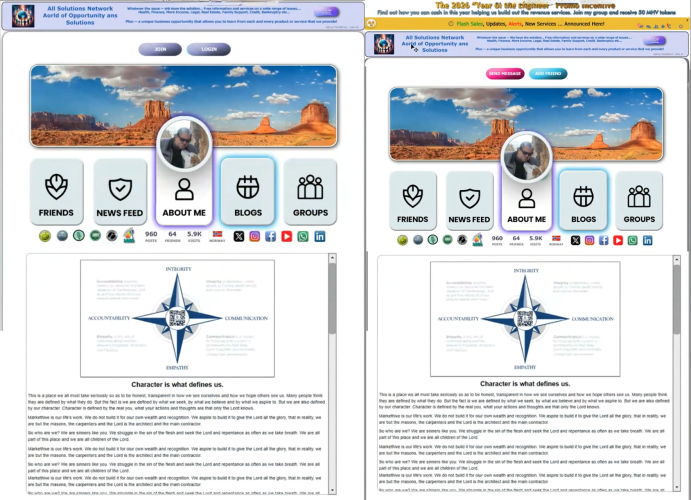
Public Default Profile Page Biography page – Logged out and logged in version
Premium Aesthetic and Universal Accessibility
Markethive is elevating personalization by introducing several unique, professional profile page designs, including an AI assistant. This assistant can search the internet for a range of options related to your specific needs, enabling the creation of a fully customized profile page. These premium themes are an exclusive benefit for upgraded members, providing a robust platform for tailoring their online presence and enhancing their distinctiveness within the Markethive community.
Crucially, Markethive is committed to a universal high-quality experience. Every single member, from the moment they join, is automatically provided with a fully functional, high-quality default version of the profile page. This ensures that all users benefit from the architecture and essential features from day one, regardless of their subscription tier.
External Visitor Experience: Focused Introduction and Clear Call to Action
For individuals visiting a profile page from outside the Markethive network, the interface is specifically designed to provide a clear, engaging, and focused introduction to both the member and the platform. These external visitors will see the BIX banner prominently displayed at the top, alongside the member's publicly accessible profile content.
A key feature of these pages is the prominent call-to-action (CTA) button. This button dynamically adjusts based on the viewer's status and their connection to the profile owner, always prompting users to either log in or join Markethive to unlock all comprehensive, interactive features.
Profile View Scenarios:
- Logged Out: The default public profile displays "Join" and "Login."
- Logged In (Not Connected): When viewing someone’s profile who isn’t your friend, the option available is "Add Friend".
- Clicking "Add Friend" changes the button status to "pending" until the request is accepted.
- Once an "Add Friend" request is accepted, the button is replaced with "Send Message."
- Logged In (Connected): If the profile owner is already a friend, only the "Send Message" button is visible.

Your Default Profile Page, personal newsfeed, editorial view, and social media account integration
Default Profile Page Features for Enhanced Branding and User Experience
Centralized Content Creation and Profile Management
The Markethive platform is designed to provide a smooth, intuitive, and integrated user experience, focusing on convenience and efficiency for content creation and profile management.
- Effortless Content Posting: The advanced HTML editor is conveniently positioned at the top of the personal newsfeed, enabling users to quickly post rich, detailed content directly from their profile. Its intuitive location makes it easy to share updates and insights with both professional and personal networks.
- Simple Profile Editing: Updating core profile details, such as the biography or "About Me" section, is straightforward. A small pencil icon within the biography window opens a user-friendly editor for quick updates. This easy editing method also applies to managing personal blogs and groups. Keep in mind, the group management interface is focused only on administrative tasks and shows only groups created by the user.
Customization and Visual Branding
Profile customization is made simple with immediate visual control, which is essential for maintaining a professional and current online presence.
- Intuitive Image Control: A clearly visible button allows users to manage and update their main profile picture and cover photo. They can effortlessly upload, crop, and perform basic edits on new images to align with their branding or personal style. The instant visual feedback and streamlined process motivate members to keep their profiles visually appealing and up to date.
Integrated Digital Hub and Performance Overview
The Markethive profile page serves as a comprehensive central hub, enhancing a member's overall digital reach and transparency.
- Multi-Platform Social Integration: The profile supports multi-platform integration, allowing members to manage their connected social media accounts via a simple drop-down menu. Crucially, six of these connected social media platforms are prominently displayed, transforming fragmented efforts into a cohesive branding asset.
- Real-Time Activity Snapshot: The page offers a clear, real-time view of the member’s activity and reach. Important performance data includes the number of published posts, total friends or connections, page visits, and the member's verified country of origin.

A logged-in view of one of the various profile page upgrades – Bio and Personal Newsfeed
Dynamic Display of Status, Achievements, and Engagement for Default and Upgraded Profile Pages
The profile pages are dynamic showcases of a member's activity, influence, and achievements within the community. Key status and achievement icons are automatically assigned and prominently displayed, providing instant visual markers of credibility and engagement. These include:
- Hive Rank: A key metric that reflects the member's influence, level of community activity, and overall standing.
- KEY: An icon indicating ownership status and verification within the Markethive system.
- Micropayment Activation: Signifying that the member has successfully enabled the functionality to send and receive micropayments on the platform.
- Status Icons: Other dynamic indicators that reflect the user's current online status or other platform-specific markers relevant to the user.
Furthermore, the profile page offers a clear, real-time snapshot of the member's activity and reach, highlighting key data such as the number of published posts, total friends or connections, page visits, and the member's verified country of origin. Members can also boost their external credibility by adding a link to their website.
Strategic Communication and Advertising Placement
The profile pages serve as a critical communication channel and a premium advertising asset:
- Entrepreneur One BIX Banner Display: Located strategically above the main profile toolbar, this area is reserved for the Entrepreneur One BIX banner display. This premium placement ensures maximum visibility for high-impact advertising messages.
- Immediate Alert Bar: An essential alert bar runs persistently across the top of the entire profile page. This dedicated channel is used for immediate, critical announcements, communicating platform information such as notifications about newly launched services, essential system updates, and timely flash sales exclusively offered by Markethive.
Personal Newsfeed and Content Creation Power
Each profile is equipped with a dedicated personal newsfeed that curates a focused content experience. By default, this feed is designed to display only the content the member has personally published. Members also have granular control to optionally display member comments on their content in this personal feed.
- Direct Publishing Gateway: From this personal newsfeed, members can open the newsfeed publisher directly. This empowers them to create and post new content immediately from their profile page, thereby guaranteeing a smooth, highly productive content-creation workflow.
Dedicated Blogging, Media, and Community Access
The profile page serves as a launchpad to the member’s complete digital footprint in Markethive.
- Integrated Blog Management: A prominent icon is dedicated to the member's Blog(s). These are the blogs that are set up and intrinsically associated with that specific profile page. Furthermore, the system is designed to allow members to effortlessly create additional blogs by simply accessing the blog editor directly from the profile page, removing the need for extensive navigation to separate platform areas.
- Comprehensive Media and Group Access: A suite of further icons provides instant, one-click access to the member's interconnected activities across the platform, including:
- Groups: Direct access to all the Markethive groups the member is associated with.
- Video Feed: A consolidated and easily viewable feed of the member's uploaded video content.
- Image Feed: A dedicated gallery showcasing the member's uploaded images.
- Conference Room: Instant access to the member's personal virtual meeting space.
For logged-in Markethive members, all icons and their corresponding features are fully functional and easily navigable. However, some features are only accessible to upgraded profile pages or members with a specific subscription upgrade.
Granular Control Over External Visibility
A core feature of the new profile is the powerful ability for members to control the public visibility of their features to external, non-member visitors. Members can exercise control by turning specific features (icons) on or off for those who are not logged in to the Markethive platform.
- External Visitor Experience: When a person who is not logged in to Markethive visits the profile page, any feature that the member has chosen to hide will appear greyed out and be entirely inaccessible. This allows members to manage their data privacy while maintaining a comprehensive profile for logged-in connections.
Conclusion
Markethive Profile Pages offer a significant, forward-thinking upgrade to enhance the member experience. Users benefit from greater control and efficiency through centralized, intuitive editing and management tools. Key features include a high-quality default profile for everyone and a range of premium aesthetic options, making it easier to create and manage a strong personal brand.
The profiles serve as dynamic showcases, prominently displaying members' achievements, status icons such as Hive Rank and KEY, and real-time activity metrics. Paired with strategic communication tools such as the BIX Banner Display and the Immediate Alert Bar, along with the ability to manage public visibility, this model establishes the Markethive profile as the ultimate, functional, and visually appealing hub for a member's entire digital identity and entrepreneurial efforts within the ecosystem.
.png)